Showing posts with label 3D. Show all posts

11 March 2023

I once saw a SKP file THIIIIIIS big

 (Originally posted to the "Corner Bar" of the SketchUp forums)


I've seen about a half-dozen posts this morning from users making SketchUp files in sizes I frankly never would have dreamed possible in a thousand years. I think the largest file I've ever made in SketchUp was maybe 10MB. 90% of my work is for 3D printing, so I don't really need a lot of components, textures, or assets from the 3D Warehouse, and geolocation is only handy for a few practical demonstrations of scale.  

One of the files I saw someone have difficulty opening was almost 300MB. A lot of it turned out to be some unused components, and a quick purge from my fellow users with Enlightenment levels of patience brought it down to a somewhat more manageable 100MB. 

Moments later, I happened upon another forum post from someone else having difficulty opening a file. I get a bit worried; maybe there's something wrong with 2023 that's emerging or some compatibility issue with Apple Silicon nobody's worked out just yet. I click on the provided Google Drive link and almost fell out of my chair. 
It was nearly a full gigabyte. I mean... how? I'm frankly surprised it took getting to that size for them to start having issues. It's as if they made everything in one single session and only reopened it the next day. 

This isn't me knocking these folks for not being efficient. I recently spent a fair chunk of time re-uploading the same model file to the 3D Warehouse because I could not for the life of me figure out how a shipping pallet with a default texture was a full megabyte. It was literally made from a single component (a plank) arranged in the overall shape of a pallet. Even with the default scale figures (of which there were two for some reason) successfully purged, it was showing up as a full MB. It finally dawned on me that I had saved the geolocation in the file, complete with satellite image and topography. Obviously, that's not going to be much use to someone who just wants something for their forklift to pick up and set down, so it had to go. The final tally sits at 89KB. 


I was an early adopter of the browser-based version of SketchUp (I've still got files that have the "my SketchUp beta" watermark on them), so I've been at this for a while, and even I can still lose sight of the bigger picture and bog down a file with unnecessary guff. I think we're also all spoiled on larger hard drive sizes and file transfer services like WeTransfer and Drive that we don't see a large SKP as any big deal. I scoffed once at a YouTube video of someone proudly bringing the size of their file down to a few hundred kilobytes. Now, I understand. 

It's important that, when we pass on our knowledge to others, be it at work or through these forums or YouTube comments or wherever, that we emphasize simplicity and efficiency. Space-saving tricks like components should be introduced as early as possible, even if the other person doesn't grasp it right away. It will plant a seed in their mind that they don't have to model multiple identical versions of an object. It will teach them to think more laterally and embrace "creative laziness." 

Thanks for coming to my corner of the corner bar. 

Goodnight, and good luck.

07 March 2018

If You Love TinkerCAD So Much....

UPDATE 13-MARCH-2018: After much e-mail correspondence with the CEO and founder of SelfCAD, along with concerted efforts between him and his staff, some issues described below have been resolved. Still, more remain as of the time of this update. My final assessment as of now is that this program is not in a state of viability that makes it worth my time and effort to invest in. I've formally requested a refund of my annual license which I am assured will go through in a few business days. 
I have no intention of retracting or editing this entry beyond this update, as at best I could simply replace it with an at least equally-lengthy exploration of the new issues I was able to demonstrate for the SelfCAD team earlier today. Rather, I'm going to leave that new information between us for them to use as they see fit moving forward. Although I'm no longer using SelfCAD, I want to make something clear to anyone whose interest in the program led them here. 

Go ahead and try it. 

No, I'm serious. For all I've said and all the more I would have to say, I don't begrudge SelfCAD or anyone involved in the project for the state of the app. I have the fullest confidence they will sort out the issues and get to a state that will hold its own against the likes of Fusion360 and Sketchup, and certainly run circles around TinkerCAD and OpenSCAD
There's also the notable possibility that you could use the app and never have any of the problems I had with it. A fellow engineer mentioned giving it a try and falling in love with the sculpting features (which I barely bothered with at all), and was shocked at the screenshots I posted. He never encountered these errors, but he used the app differently than I did. To put it another way, your mileage may vary. You've got 30 days, use them.

I'm honestly still looking forward to an iPad version. I'll be there day one to try it out. 

END OF UPDATE.

TinkerCAD is a very simple 3D modeling program meant for 3D printing. Many scoff at its simplicity, calling it a kid's toy. What's ironic is that many of the scoffing remarks seem to come from people who use OpenSCAD. OpenSCAD is a needlessly complicated and obtuse graphics modeler the use of which is best described as attempting to teach a graphing calculator to play chess. To be fair, at least their dismissal has nothing to do with the price tag. That distinction gets left to the other scoffers who swear by the likes of Autodesk Inventor
As far as 3D printing goes, Inventor is overpowered. More than half of its features are completely useless, and I don't like paying full price for something I can only use half of, I don't care if it's somehow nice to have the option for more. There's no denying its usefulness and versatility, I simply have no need for it. That said, I'm always looking for an alternative to TinkerCAD, since there are times when I find myself using far too many workarounds for its limitations. Tragically, there used to be a middle ground to this paradigm in the form of 123D (also from Autodesk), which has since been discontinued. To fill this gap, Autodesk overhauled Tinkercad to have a few more features than previous versions, and the rest of their focus has gone to a CAD program called Fusion360. I've used Fusion360 and while I don't hate it, any time I tried importing a model to modify or edit, it never, ever got the scale right. No matter what I set the original model to, meters became feet, feet became inches, and millimeters became yards. It seems as if I have to start completely from scratch within its borders and never venture outside its ecosystem. I looked into the issue to see if I was doing something wrong. It turned out this was a known issue and Autodesk had not yet fixed it. The forum post that outlined this was dated 2015, and I was first trying this program in 2017. 2 full years and no progress on a simple matter of making the program understand scale, the most basic principle in technical drawing and engineering. It'd be laughable were it not so infuriating. 
I've talked before about how tech support is often so reluctant to admit when their program can't do something, reasons being 1) It's their product/paycheck, of course they're not going to talk trash about it, however valid the criticism, and 2) there's always the possibility of a feature being added or a known issue finally being resolved. Here's why this outlook needs to be shut down. To address the first point, if your program cannot work as it has advertised itself and/or is simply not suitable for a given application, it's less suspicious to spell out what exactly your product can and cannot do so you can focus on what works and get it in the hands of the right people who can make the most of it. Secondly, if I'm paying for an annual license, every day I'm made to wait on getting an issue resolved is time I can't actually use the program. I can't wait on a possibility. I'm going to find something else, and I'm either not going to renew my license, or I'm going to fight to get it refunded, and with the issue I'm having now with SelfCAD, I have a strong leg to stand on. 
SelfCAD is a browser-based 3D modeling program just like TinkerCAD, but with an interface somewhat closer to Fusion360. It doesn't have the scaling issue of the latter, but it is going to take you some time to work out exactly what scale the program is working in. To be fair, the only reason this is a problem is that not only is SelfCAD create 3D models, but it can also prepare them for 3D printing by having its own slicer. Scales can ultimately be adjusted when moving from program to program, of if the model is only going to be viewed on a screen, but when printing a physical object, it's important to get the scale right. While I have had some issues with the slicer, they don't compare to the issues I've had with making a simple model, not being able to make it, and then being given two pieces of advice from their technical support team that simply do not pan out as insisted. 

All I'm doing is taking a simple shape, like a cube or a hexagonal prism, 
twisting it, 
and then putting a cylindrical hole in the middle of it. 
Setting aside the practical use of this model, this shouldn't be a great challenge for a program meant for producing three-dimensional solid objects for 3D printing or other means of fabrication. However, when the time comes to subtract the cylinder from the twisted block:
It's a little hard to tell what's going on from this angle, but removing the cylinder has hollowed out the entire interior of the twisted block. 
This should not be a difficult task to perform. I inform SelfCAD of this issue through their site and get an acknowledgment in my email inbox:
"we have received your message and are currently investigating the issue."
Along with this, the following video from their YouTube channel is included: 

Seems simple enough, except I followed this tutorial exactly and got a different result. At least, it seems I got a different result; we don't see whether or not the bat symbol got the same sort of hollowing out or if it had a proper rectangular hole. I bring this up in my reply to that first e-mail. Roughly 5 whole days pass before I get the next reply:
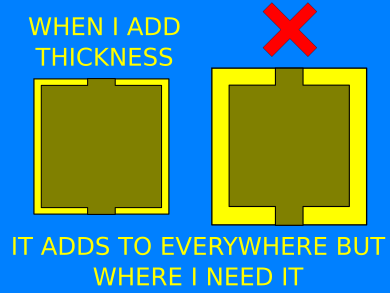
"If you apply the Add Thickness tool with thickness set to 1 to cube after the hole was made, you should get your desired result."
No. No, I do not get the desired result. I literally get a worse result. Not only is the shape still hollowed out where it shouldn't be, but thickening the walls have thrown off all the external dimensions. 
Adding thickness does not fill in the volume around the space left by the subtracted cylinder. Instead, it adds thickness to the entirety of the hollowed shell, expanding its overall size. 
I mean, this is almost insulting. Who would call this a viable solution to the problem of making a cylindrical hole in a given shape. I honestly wonder if they tried this themselves before passing the info off to me. Also, on the off-chance I'd gotten the wrong information, I tried applying the thickness to the shape before subtracting the cylinder.
I don't even know how to approach that situation, especially when the "undo" shortcut simply stops working for no good reason. I shared these updates with SelfCAD, and I have yet to receive a response. Given the 5-day turnaround on the last interaction, I'm not optimistic about receiving this update in a timely manner. The only reason I'm even concerned about the turnaround time is that I've purchased an annual license to use this software. If it can't handle what should be the simplest task possible, and everyday I can't use it effectively goes against that annual license, I'm wasting money on something that doesn't work, and can't even get a straight answer on whether or not that's supposed to work to begin with. 

To give an idea of how simple this process should be, here's the same exact process done in TinkerCAD:
SelfCAD, I am legitimately regretting my contribution to your cause. Not only does this not make me want to buy another annual license, but I'm going to lobby for compensation on what I've already paid. This is absurd. OpenSCAD doesn't even have this problem. 

I kid you not, the day I wrote this, I got an email from SelfCAD inviting me to their ambassador program. How can I represent something that it seems no one at the company knows how to operate? 

07 February 2018

A Sketchy Arc

Damn it, Sketchup, why do I have to fight with you so much? I keep trying to give you the benefit of the doubt that you've simply got a learning curve and how you work as a 3D modeling program isn't like those other 3D modeling programs. I write these long, angry diatribes about how making a sphere is like summoning a demon while on the moon and with a bucket over my head, yet I wait. 
Now, today, after revisiting the browser-based version, I swear you're pulling the wool over my eyes. 


I was literally trying to recreate what I saw in this video in another tab and at around the 4:10 mark, I see a sleight of hand. This is the comment I left verbatim and a screenshot of exactly what I was seeing when I tried to follow along.

Okay, I hate to be "this guy" but I feel like we're either missing a step or calling a tool by the wrong name. I'm literally following this to the letter in another tab right now and my arc tool isn't working like this... at all. I didn't even see you click on the arc tool, it was just selected after you made the line.
I make the vertical line, put the circle on top, draw another line from the center of the base to the edge... and then the arc tool acts nothing like what I'm seeing on screen. I click on the arc tool and I get a compass overlay that keeps trying to draw an arc that's convex to the vertical line. After some fiddling to try and at least get the arc to be concave, it doesn't go from the edge of the base to the circle up top. It's only as tall as it is wide and trying to tweak it gets me an error message about too many segments.
I have no clue what I'm doing wrong and I feel like this happens every time I try to do anything in Sketchup.

It may be a little hard to see, but that little green circle near the edge of the base is what I somehow have to place somewhere to make an arc between the edge of the base and the circle atop the line. It's also worth repeating that we saw this tutorial first select the arc tool, then change their minds and select the line tool, draw a line from the center of the base to the edge, and next thing we know we're drawing an arc between those two points. 


Let's be clear: you have to select the tools on the left hand side of the screen. His mouse cursor never ventures close to that and suddenly we go from a line tool to an arc tool. I can't find any keyboard shortcuts that would allow this, and even if I did, the arc tool doesn't work as it's being shown. 

This is why I hate learning any kind of software. There's always something in the tutorial (which I've sometimes PAID for the "opportunity" to sit through) that is not accurate, it's fairly important, and whoever I learn it from gets so embarrassingly tripped up it's like watching someone try to recite the alphabet backwards and start over every time they mess up. Normally, when I've written these, I leave them in the drafts folder until I calm down a little, I read a few more tutorials, wind up feeling stupid because I missed something obvious, and then the post never goes live due to its newfound inaccuracy. Given I've also left a comment on the video, I should probably wait until I get an answer to that before I go pressing the publish button. However, I've wound back this video at least five times and whatever the instructor is doing, it's not working when I try to do exactly as he says. 

Please, whatever I'm doing wrong, tell me. 
I'm not trying to shame anyone. I just want the damn thing to work as advertised. 

UPDATE: Okay, so about an hour after posting this, when I was still too frustrated to sit back down and give it another go, I reasoned that maybe it was the 2-point arc tool being used. This morning it turns out I'm right. So, that half of the mystery is solved, but it doesn't explain how he selected the arc tool, to say nothing of simply not specifying which of the 4 distinct arc tools he was referring to. I mean, that's kind of important. How many shapes are there?

Also, the top of the pawn is hollow now, and that's an improvement over the first time I tried using the "Follow Me" tool in order to make the upper portion.

UPDATE II: It's the mid-afternoon, and Sketchup responded to my YouTube comment, but only about halfway. 
Het Matt! InSketchUp Free, the nested tools show the last tool you clicked on. In this video, Aaron is showing the default tools (the ones that are available by default when you first start Sketchup Free). In the case of the Arc tool, 3 point Arc is the default, but if you clicked on 2-point Arc previously, that will be the tool that activates when you click on the Arc icon. Your best bet is to start a totally new session of Sketchup Free and try again.
Like I said before about the 2-point arc, he selected that particular arc tool, which means that if he ever goes back to it, that's the one that's selected. Fine, except that's not my problem. Not specifying which arc tool is annoying enough, but he seems to select it without using his cursor at all. There's a keyboard shortcut for the Arc tools, which is "A" conveniently enough. What's not convenient is that he doesn't mention this in the video and I don't even think it's mentioned in another video dedicated to explaining all the different arc tools. Exactly how "Step 1" is this chess piece tutorial? Admittedly, that's on me. I'm hardly a stranger to Sketchup, and I haven't touched the software in a while, so forgetting a shortcut or two isn't Trimble's fault. Known issues, though.... 

A quick check on the forums also revealed that if your model is too small, Sketchup will not draw certain faces. In my case, because my pawn is small, it puts a hole in the top. Here's where this software starts to fail at justifying its 800USD full version. If I take my model, before I use the "follow me" command to make a sphere and a pillar, and scale it up, it not only makes the sphere whole, but if I then scale it back down to where it couldn't draw the full sphere, there's still no hole. 
I'm not changing the number of polygons when I scale it, so why does the overall size matter? 

21 July 2017

Stupid and Pointless 500 Index

This is a customer review on the Apple iTunes store for Meshlab's iOS application. Meshlab is described thusly: 
MeshLab for iOS is an advanced 3D model viewer. MeshLab for iOS has been designed to be able to display complex 3D models in a simple and intuitive way, allowing the accurate inspection of a 3D model through a precise yet straightforward navigation. 

I've used the desktop version of Meshlab off and on for a few months, and it's pretty handy. I was looking to get the iPad version so if I wanted to show off a model before printing it, I'd have options beyond e-mail, flash drives, or Dropbox
"When you open the game,"
It's not a game, it's a productivity app. It's a minor point, and I'm sure he meant to say "app", but it helps establish a pattern that's worth noting.
"there are a few models to choose from. It wouldn't let me change or edit them in any way besides changing the light effect. There wasn't a color button a shape button, nothing!"
This is almost a fair point, as the desktop version does allow you to paint the imported models, albeit crudely and with some questionable export settings. As for the shapes button, once again we're back to the main issue that this program is a viewer. It is not full-fledged modeling software. It never proclaims to be anything more than that, thus setting expectations by which it should be judged. Does it perform as advertised? If not, then that's a bad product. If it does, then it's ample, serviceable, adequate... etc.. If it has features beyond those advertised that are competently executed, then that's a fantastic app. If I expected you to fly by flapping your arms while thinking happy thoughts, would that make my criticism that you are a worthless person no one should ever have to deal with valid? 
"So I tried deleting all the models to see if i would then be able to create a new one. Nope."
You didn't try looking on the website or finding any information on how to use the app? You didn't think to look in the app's Help menu to see if the feature was even available? What makes more sense from a design perspective, hide the "new" button until all documents are deleted (especially considering there are only 4 default models in a drop-down menu that goes all the way to the bottom of the screen), or keep the button visible but display an error message that there is not enough room? Imagine if the fuel gauge of a car disappeared until the needle approached empty. 
"I couldn't even do anything because I didn't have any models to edit. There wasn't a plus button to make a new model."
A typical setup for a VIEWER. 
"so that basically made the app useless!"
As useless as a bicycle is for climbing Mt. Everest... As useless as a Jeep is for entering a low earth orbit... As useless as a can opener is for removing a computer virus... as useless as wishful thinking is for overturning DNA evidence... 
"Look, I'm not an app inventor."
Indeed.
"And I'm sure it's harder than it may seem. But seriously! You can do better than this!"
Yes, there are tablet-friendly 3D modeling programs out there, though their numbers are significantly fewer since Autodesk axed the better part of the 123D repertoire, but that doesn't change the fact that Meshlab is a VIEWER and not an EDITOR. 

I know I'm likely blowing this out of proportion; the app is doing well and this little one-star diatribe isn't going to hurt that for an instant. Also, it's certainly not as big a display of ignorance is the yahoo from a few months back who paid ten dollars for the SketchUP Viewer app ("viewer" is in the name) and complained that he couldn't edit anything. 

09 September 2016

SketchFab Embedding

The last time I dabbled in 3D modeling was around 2003 with Poser 4 and Strata Base. More recently, I've been focused on CAD programs used for 3D printing, but in learning those I've come across the likes of Sculptris and Meshmixer. I'm a long way from selling game assets on Unity, but it's been fun experimenting like this.


    Severed Alien Head
    by Roland MJ Ziemke
    on Sketchfab


    Brain Beast
    by Roland MJ Ziemke
    on Sketchfab


02 September 2016

Pomeroy Printing: Sculptris to Shapeways with texture

Pomeroy Printing: Sculptris to Shapeways with texture: I got into Sculptris a while back, and it's a great (free) program to sculpt organic objects. Only recently did I start painting the obj...

23 February 2016

Voxel (sketchfab embed test)

<a href="https://sketchfab.com/models/96a63a453f3f4963836c792fca979e92/embed">https://sketchfab.com/models/96a63a453f3f4963836c792fca979e92/embed</a>
<p style="font-size: 13px; font-weight: normal; margin: 5px; color: #4a4a4a;"><a style="font-weight: bold; color: #1caad9;" href="https://sketchfab.com/models/96a63a453f3f4963836c792fca979e92?utm_medium=embed&amp;utm_source=website&amp;utm_campain=share-popup" target="_blank">room</a>
by <a style="font-weight: bold; color: #1caad9;" href="https://sketchfab.com/wataru.kannuzuki?utm_medium=embed&amp;utm_source=website&amp;utm_campain=share-popup" target="_blank">Roland MJ Ziemke</a>
on <a style="font-weight: bold; color: #1caad9;" href="https://sketchfab.com?utm_medium=embed&amp;utm_source=website&amp;utm_campain=share-popup" target="_blank">Sketchfab</a></p>

21 December 2010

TRON LEGACY (culled from DevART Journal)

As long as it's on my DevART journal, I might as well post this portion of that entry here:


TRON LEGACY... Awesome. Simply Awesome. Whatever definition you attach to the word "awesome," throw it out and build up a new one, remembering that "awe" is the first syllable and you'll have an inkling of an idea of what seeing this movie was like for me. Sure, I have a few nitpicks and complaints, but it's kind of like when I saw the H2G2 movie; given everything that stood in that movie's way, that it exists at all is about as fulfilling a feeling of vindication as any success it endured thereafter.
If I do have one regret, it's honestly that I saw it in 3D.
The 3D is fine... for 3D scenes. Everywhere else (namely the real world), the glasses just put a yellow-green haze over everything. The worst part is the movie seems to be aware of this, but won't quite own up to it; at the beginning, we're treated to a rather odd title card (this isn't a direct quote, it's just the best I can recall):

The following 3D presentation has scenes that were shot in 2D. This is intentional and how the film was produced.

Please do not remove your 3D glasses for these segments.


In other words, unlike Avatar, which was fully shot in 3D or How to Train Your Dragon, which was fully CG and could therefore be easily switched between 2D and 3D, Tron was only partially shot in 3D, the remainder being 2D and only partly converted later. At one point, I ignored the title card's demand to leave the glasses on and slipped them off for one of the early scenes to find not even so much as a ghosting effect around anything or anyone, a tell-tale sign of the conversion process in any 3D film. I shouldn't be mad, as I guess the alternative would be an immersion-breaking interjection cuing the audience to put on or take off the glasses. Still, I wouldn't have been disappointed if I never saw it in 3D. When it hits the second-run theaters, and if it does so in a 2D format, it's definitely getting at least one more re-visit from me. Hell, I'm wrestling with seeing it again now. The last film to have that kind of effect on me was Final Fantasy: The Spirits Within, which I did see twice in theaters*.

Yes, I'm generally that hard to impress and my taste in films is that hard to place and predict.

*(How to Train Your Dragon was close, but not quite there).